
AI Gateway 整合教學
本頁彙整各種常見工具/SDK 的 DGrid AI Gateway 整合教學,方便你在同一頁面快速跳轉與查找。
Cursor(覆寫 OpenAI Base URL)
- 取得你的
DGRID_API_KEY(請先看 AI Gateway 的先決條件)。 - 開啟 Cursor Settings → Models。
- 在 API Keys 區塊啟用 Override OpenAI Base URL。
- 將 Base URL 設為:
https://api.dgrid.ai/v1
- 在 OpenAI API Key 貼上你的
DGRID_API_KEY。 - 模型名稱使用 DGrid 統一格式(例如:
openai/gpt-4o)。
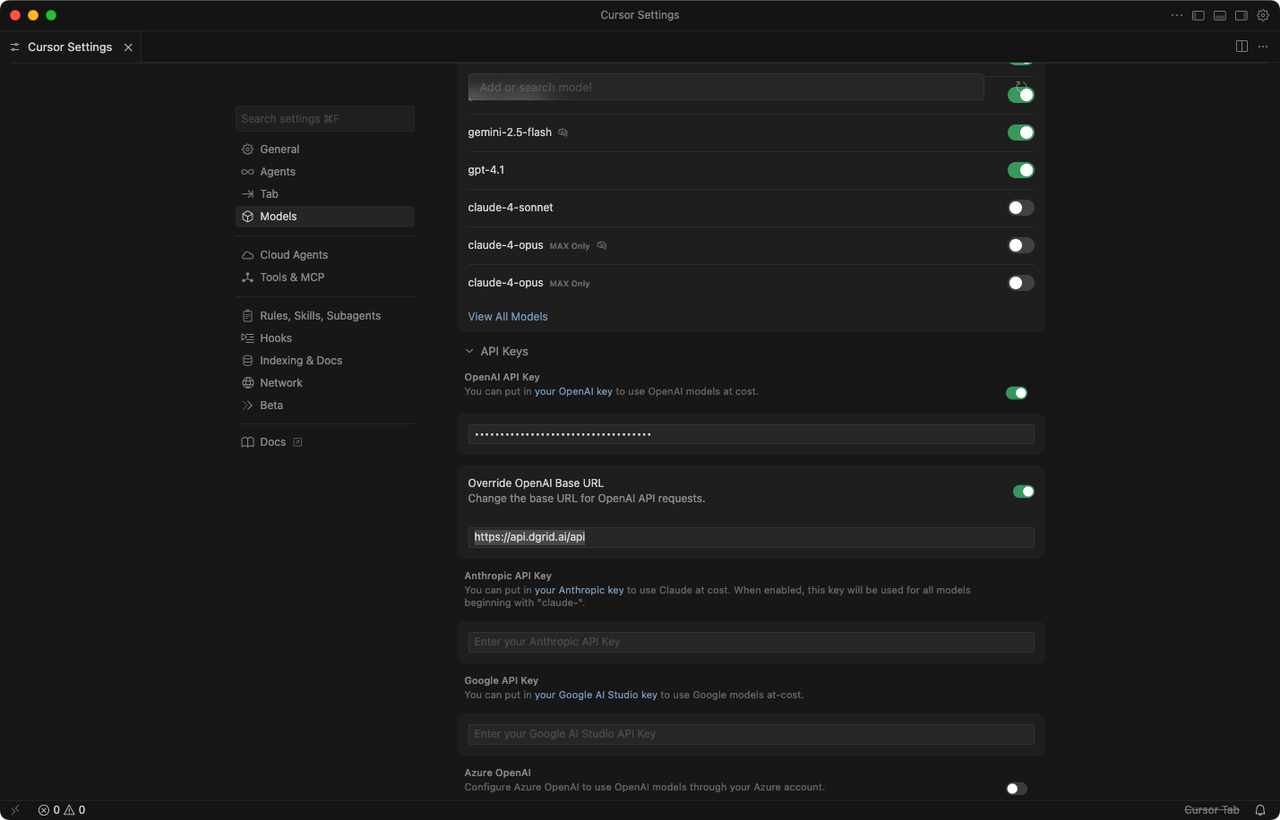
完整教學(Blog):How to Configure and Use DGrid AI Gateway in Cursor
OpenAI SDK(Node.js / Python)
- 請參考:AI Gateway 快速入門
OpenClaw
你可以在 OpenClaw 中透過 DGrid AI Gateway 的 OpenAI 相容端點完成模型連線設定。
- 開啟 OpenClaw 的模型或 provider 設定頁面。
- 將 API Base URL 設為
https://api.dgrid.ai/v1。 - 在 API Key 欄位填入
DGRID_API_KEY。 - 選擇一個 DGrid 支援的模型 ID。
- 儲存設定後,送出一個測試請求確認連線正常。
Blog 整合教學彙整
- AI as Workspace (AIaW):Step-by-Step Guide: Configure DGrid AI Gateway in AI as Workspace (AIaW)
- AnythingLLM:Tutorial: Using DGrid AI Gateway with AnythingLLM
- Chatbox:Step-by-Step Guide: Configure DGrid AI Gateway in Chatbox
- Claude Code:Use Claude Code with DGrid
- Codex CLI:Using Codex CLI with DGrid: A Complete Guide
- Junie CLI:Step-by-Step Guide: Integrate DGrid with Junie CLI
- LibreChat:Using DGrid with LibreChat: A Step-by-Step Guide
- LobeChat:Configuring and Utilizing DGrid AI Gateway in LobeChat: A Full Guide
- Open WebUI:Using DGrid AI Gateway with Open WebUI: A Comprehensive Guide
- OpenClaw(Agent 平台):Supercharging OpenClaw with DGrid: The Ultimate AI Agent Setup
- OpenClaw(免寫程式):Step-by-Step Guide: OpenClaw Installation & DGrid AI Gateway Setup (No Code Required)
- Vercel AI SDK:How to Use DGrid AI Gateway with the Vercel AI SDK