
AI Gateway Integration Tutorials
This page collects practical integration tutorials for using DGrid AI Gateway in common developer tools and SDKs.
Cursor (Override OpenAI Base URL)
- Get your
DGRID_API_KEY(see the prerequisite in AI Gateway). - Open Cursor Settings → Models.
- Under API Keys, enable Override OpenAI Base URL.
- Set the base URL to:
https://api.dgrid.ai/v1
- Paste your
DGRID_API_KEYinto OpenAI API Key. - Pick any supported model name using the DGrid format (for example:
openai/gpt-4o).
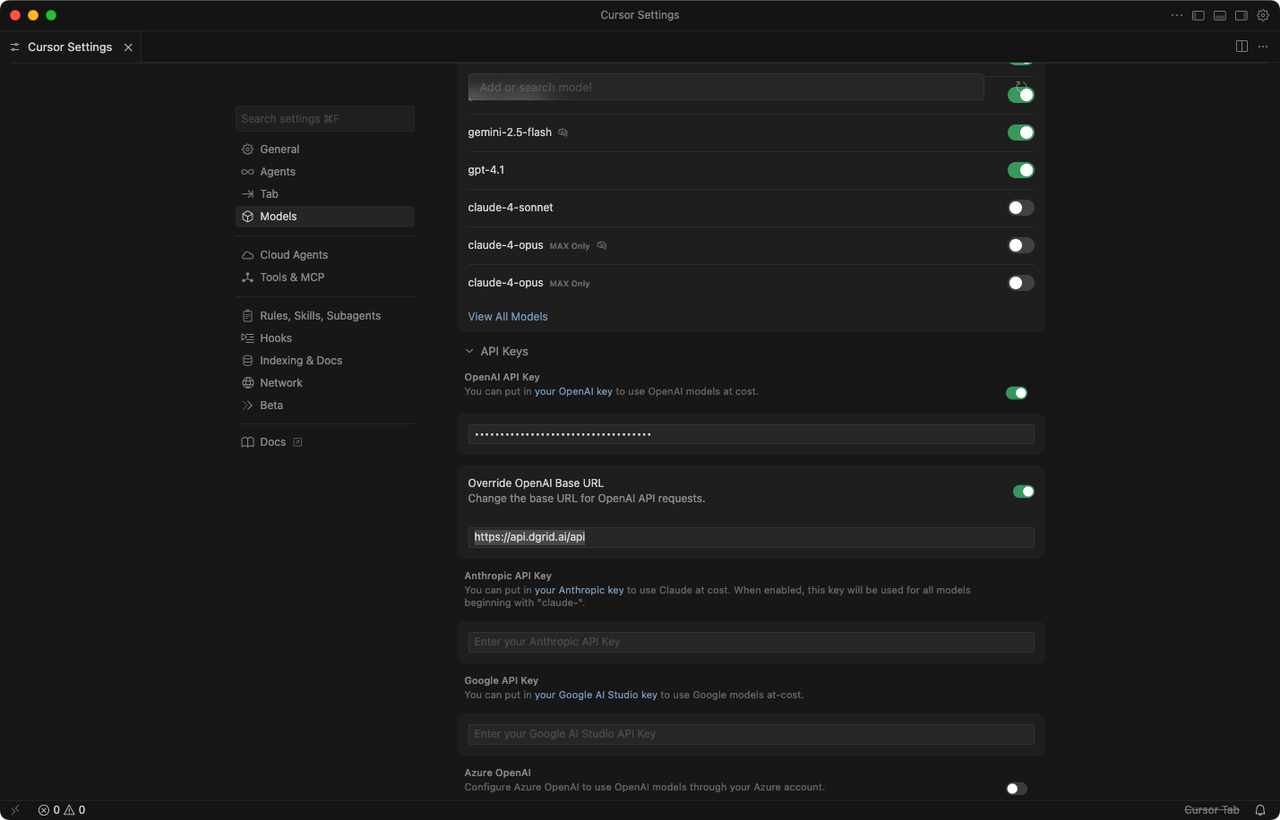
Full tutorial: How to Configure and Use DGrid AI Gateway in Cursor
OpenAI SDK (Node.js / Python)
OpenClaw
You can configure OpenClaw to route requests through DGrid AI Gateway using the OpenAI-compatible endpoint.
- Open your OpenClaw model/provider settings.
- Set the API base URL to
https://api.dgrid.ai/v1. - Paste your
DGRID_API_KEYinto the API key field. - Select a supported DGrid model ID.
- Save the configuration and run a quick test request.
Blog integration tutorials (collected)
- AI as Workspace (AIaW): Step-by-Step Guide: Configure DGrid AI Gateway in AI as Workspace (AIaW)
- AnythingLLM: Tutorial: Using DGrid AI Gateway with AnythingLLM
- Chatbox: Step-by-Step Guide: Configure DGrid AI Gateway in Chatbox
- Claude Code: Use Claude Code with DGrid
- Codex CLI: Using Codex CLI with DGrid: A Complete Guide
- Junie CLI: Step-by-Step Guide: Integrate DGrid with Junie CLI
- LibreChat: Using DGrid with LibreChat: A Step-by-Step Guide
- LobeChat: Configuring and Utilizing DGrid AI Gateway in LobeChat: A Full Guide
- Open WebUI: Using DGrid AI Gateway with Open WebUI: A Comprehensive Guide
- OpenClaw (agent platform): Supercharging OpenClaw with DGrid: The Ultimate AI Agent Setup
- OpenClaw (no-code): Step-by-Step Guide: OpenClaw Installation & DGrid AI Gateway Setup (No Code Required)
- Vercel AI SDK: How to Use DGrid AI Gateway with the Vercel AI SDK