Redeem a DGrid Credit Code from the Billing page and apply the credits to your DGrid account.
DGrid Credits let you access leading models on the DGrid platform. If you received a DGrid Credit Code, follow these steps to apply it to your account.
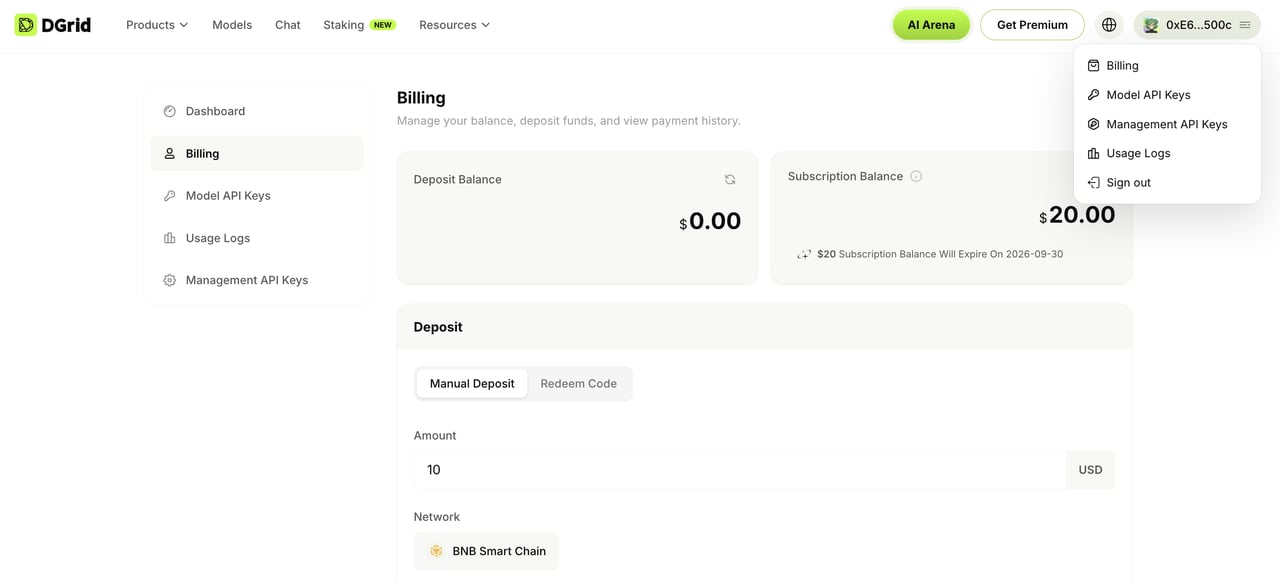
Click your profile icon in the top-right corner and select Billing.
Open Billing from the profile menu
3
Validate your Credit Code
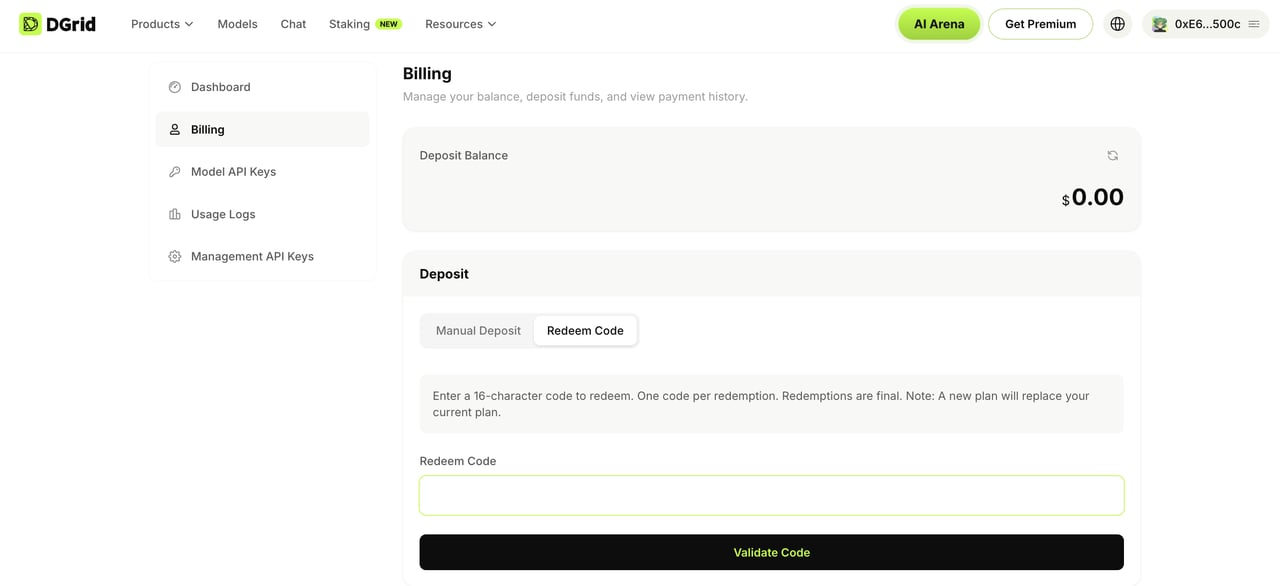
On the Billing page, scroll to the Deposit section and click Redeem Code. Enter your code, then click Validate Code.
Enter and validate your DGrid Credit Code
4
Confirm the redemption
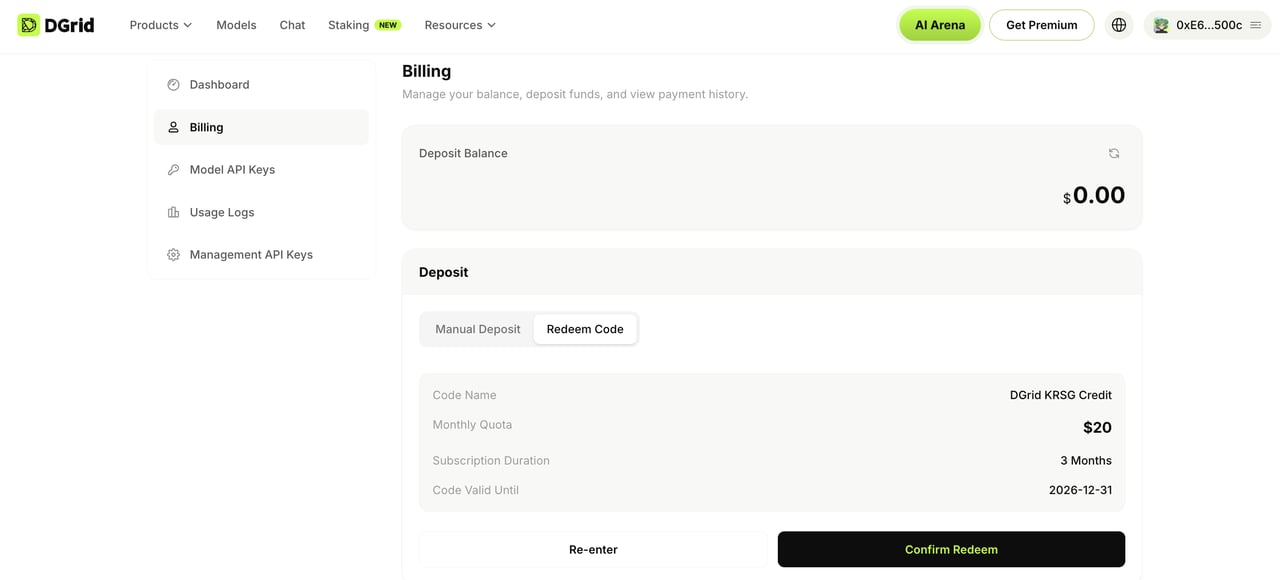
Review the code details and click Confirm Redeem. Your DGrid Credits are applied to your account immediately.
Review the Credit Code details and confirm the redemption
After the credits are available, you can start using DGrid. If you have trouble redeeming your code, contact the DGrid team on Telegram.
{"docsConfig":{"theme":"aspen","$schema":"https://mintlify.com/docs.json","name":"DGrid AI Docs","description":"Documentation for DGrid AI: The Decentralized Smart Network of AI","colors":{"primary":"#65A30D","light":"#A3E635","dark":"#4D7C0F"},"logo":{"light":"https://mintcdn.com/dgridai/eFrQx07adP_MQw0i/logo/dgrid-horizontal-black.png?fit=max\u0026auto=format\u0026n=eFrQx07adP_MQw0i\u0026q=85\u0026s=aa7da302786ec058e3c91526a127736d","dark":"https://mintcdn.com/dgridai/eFrQx07adP_MQw0i/logo/dgrid-horizontal-white.png?fit=max\u0026auto=format\u0026n=eFrQx07adP_MQw0i\u0026q=85\u0026s=62aa06e50e86ab2394beada6a4814623"},"favicon":"https://mintcdn.com/dgridai/eFrQx07adP_MQw0i/favicon.png?fit=max\u0026auto=format\u0026n=eFrQx07adP_MQw0i\u0026q=85\u0026s=75fcb6ffc8e30d1e2be00c994cc0372e","api":{"openapi":"api-reference/openapi.json","playground":{"display":"interactive"},"examples":{"languages":["curl","python","javascript","go","java"]}},"appearance":{"default":"system"},"navbar":{"links":[{"href":"https://blog.dgrid.ai/","label":"Blog"},{"href":"https://telegram.me/dgrid_ai","label":"Support"}],"primary":{"type":"button","label":"Dashboard","href":"https://dgrid.ai/overview"}},"footer":{"socials":{"x":"https://x.com/dgrid_ai","telegram":"https://telegram.me/dgrid_ai","github":"https://github.com/dgridai"}},"icons":{"library":"lucide"},"contextual":{"options":["copy","view","chatgpt","claude"],"display":"header"},"styling":{"latex":false},"navigation":{"languages":[{"language":"en","default":true,"href":""},{"language":"zh-Hant","navbar":{"links":[{"href":"https://blog.dgrid.ai/","label":"部落格"},{"href":"https://telegram.me/dgrid_ai","label":"支援"}],"primary":{"type":"button","label":"儀表板","href":"https://dgrid.ai/overview"}},"href":"zh-Hant"},{"language":"ko","navbar":{"links":[{"href":"https://blog.dgrid.ai/","label":"블로그"},{"href":"https://telegram.me/dgrid_ai","label":"지원"}],"primary":{"type":"button","label":"대시보드","href":"https://dgrid.ai/overview"}},"href":"ko"},{"language":"fr","navbar":{"links":[{"href":"https://blog.dgrid.ai/","label":"Blog"},{"href":"https://telegram.me/dgrid_ai","label":"Assistance"}],"primary":{"type":"button","label":"Tableau de bord","href":"https://dgrid.ai/overview"}},"href":"fr"},{"language":"es","navbar":{"links":[{"href":"https://blog.dgrid.ai/","label":"Blog"},{"href":"https://telegram.me/dgrid_ai","label":"Soporte"}],"primary":{"type":"button","label":"Panel","href":"https://dgrid.ai/overview"}},"href":"es"}]}},"deployment":{"deploymentMetadataValue":{"subdomain":"dgridai","hasAudioNarration":false,"actualSubdomain":"dgridai","customDomains":["docs.dgrid.ai"],"gitSource":{"type":"github","owner":"ethanclarkeio","repo":"docs","deployBranch":"main","contentDirectory":"","isPrivate":false,"mountPath":"","label":""},"chroma":{"collectionId":"146373a5-1310-4927-bf4d-bc5f1b23b737","liveDeploymentHistoryId":"6adb04f0a28cf93daee93294","schemaVersion":"v3","latestBuiltDeploymentHistoryId":"6adb04f0a28cf93daee93294"},"entitlements":{"AI_CHAT":{"status":"DISABLED"}},"buildId":"6adb04f0a28cf93daee93294","clientVersion":"0.0.4021","searchFilterCounts":[{"language":"en","tag":"Documentation","count":36},{"language":"es","tag":"Documentación","count":36},{"language":"fr","tag":"Documentation","count":36},{"language":"ko","tag":"문서","count":36},{"language":"zh-Hant","tag":"文件","count":36},{"language":"en","tag":"API Reference","count":28},{"language":"es","tag":"Referencia de la API","count":28},{"language":"fr","tag":"Référence API","count":28},{"language":"ko","tag":"API 참조","count":28},{"language":"zh-Hant","tag":"API 參考","count":28},{"language":"en","tag":"MODEL API","count":22},{"language":"es","tag":"API DE MODELOS","count":22},{"language":"fr","tag":"API DE MODÈLES","count":22},{"language":"ko","tag":"모델 API","count":22},{"language":"zh-Hant","tag":"模型 API","count":22},{"language":"en","tag":"AI GATEWAY","count":13},{"language":"es","tag":"PUERTA DE ENLACE IA","count":13},{"language":"fr","tag":"PASSERELLE IA","count":13},{"language":"ko","tag":"AI 게이트웨이","count":13},{"language":"zh-Hant","tag":"AI 閘道","count":13},{"language":"en","tag":"Integration Tutorials","count":7},{"language":"es","tag":"Tutoriales de integración","count":7},{"language":"fr","tag":"Tutoriels d'intégration","count":7},{"language":"ko","tag":"통합 가이드","count":7},{"language":"zh-Hant","tag":"整合教學","count":7},{"language":"en","tag":"Images","count":6},{"language":"en","tag":"GENESIS PREMIUM","count":6},{"language":"es","tag":"Imágenes","count":6},{"language":"es","tag":"GENESIS PREMIUM","count":6},{"language":"fr","tag":"Images","count":6},{"language":"fr","tag":"GENESIS PREMIUM","count":6},{"language":"ko","tag":"이미지","count":6},{"language":"ko","tag":"GENESIS PREMIUM","count":6},{"language":"zh-Hant","tag":"圖像","count":6},{"language":"zh-Hant","tag":"GENESIS PREMIUM","count":6},{"language":"en","tag":"Chat","count":5},{"language":"es","tag":"Chat","count":5},{"language":"fr","tag":"Chat","count":5},{"language":"ko","tag":"채팅","count":5},{"language":"zh-Hant","tag":"對話","count":5},{"language":"en","tag":"Audio","count":4},{"language":"en","tag":"CORE CONCEPTS","count":4},{"language":"es","tag":"Audio","count":4},{"language":"es","tag":"CONCEPTOS CLAVE","count":4},{"language":"fr","tag":"Audio","count":4},{"language":"fr","tag":"CONCEPTS CLÉS","count":4},{"language":"ko","tag":"오디오","count":4},{"language":"ko","tag":"핵심 개념","count":4},{"language":"zh-Hant","tag":"音訊","count":4},{"language":"zh-Hant","tag":"核心概念","count":4}]},"assistantConfig":{"enableAskAiButton":false,"enableStarterQuestions":false,"enableContextualStarterQuestions":false,"enableAskAiSearchBar":true},"basePath":"","hasChatPermissions":false,"hasWebMcpPermissions":false,"toggles":[{"name":"kill-isr","enabled":true,"variant":{"name":"disabled","enabled":false,"feature_enabled":true},"impressionData":false},{"name":"agent-mintlify-slack","enabled":true,"variant":{"name":"disabled","enabled":false,"feature_enabled":true},"impressionData":false},{"name":"agent-integrations-settings","enabled":true,"variant":{"name":"disabled","enabled":false,"feature_enabled":true},"impressionData":false},{"name":"automations-pr-grouping","enabled":true,"variant":{"name":"disabled","enabled":false,"feature_enabled":true},"impressionData":false},{"name":"custom-prefix","enabled":true,"variant":{"name":"disabled","enabled":false,"feature_enabled":true},"impressionData":false},{"name":"analytics-v7","enabled":true,"variant":{"name":"disabled","enabled":false,"feature_enabled":true},"impressionData":false},{"name":"user-flows-analytics","enabled":true,"variant":{"name":"disabled","enabled":false,"feature_enabled":true},"impressionData":false},{"name":"no-publish-flow","enabled":true,"variant":{"name":"disabled","enabled":false,"feature_enabled":true},"impressionData":false},{"name":"workos-onboarding","enabled":true,"variant":{"name":"disabled","enabled":false,"feature_enabled":true},"impressionData":false},{"name":"llms-txt-v2","enabled":true,"variant":{"name":"disabled","enabled":false,"feature_enabled":true},"impressionData":false},{"name":"snapshot-serving-live","enabled":true,"variant":{"name":"disabled","enabled":false,"feature_enabled":true},"impressionData":false},{"name":"stripTemperatureMiddleware","enabled":true,"variant":{"name":"disabled","enabled":false,"feature_enabled":true},"impressionData":false},{"name":"per-site-search-delta","enabled":true,"variant":{"name":"disabled","enabled":false,"feature_enabled":true},"impressionData":false},{"name":"support-platform-pylon-zendesk","enabled":true,"variant":{"name":"disabled","enabled":false,"feature_enabled":true},"impressionData":false},{"name":"snapshot-serving","enabled":true,"variant":{"name":"disabled","enabled":false,"feature_enabled":true},"impressionData":false},{"name":"instant-rollback","enabled":true,"variant":{"name":"disabled","enabled":false,"feature_enabled":true},"impressionData":false},{"name":"granular-notifications-server","enabled":true,"variant":{"name":"disabled","enabled":false,"feature_enabled":true},"impressionData":false},{"name":"granular-notifications","enabled":true,"variant":{"name":"disabled","enabled":false,"feature_enabled":true},"impressionData":false},{"name":"editor-private-page-search","enabled":true,"variant":{"name":"disabled","enabled":false,"feature_enabled":true},"impressionData":false},{"name":"automations-fable","enabled":true,"variant":{"name":"disabled","enabled":false,"feature_enabled":true},"impressionData":false},{"name":"fixed-ai-action-pricing","enabled":true,"variant":{"name":"disabled","enabled":false,"feature_enabled":true},"impressionData":false},{"name":"automation-resolve-merge-conflict","enabled":true,"variant":{"name":"disabled","enabled":false,"feature_enabled":true},"impressionData":false},{"name":"scoped-publishing","enabled":true,"variant":{"name":"disabled","enabled":false,"feature_enabled":true},"impressionData":false},{"name":"mintql","enabled":true,"variant":{"name":"disabled","enabled":false,"feature_enabled":true},"impressionData":false},{"name":"page-level-analytics","enabled":true,"variant":{"name":"disabled","enabled":false,"feature_enabled":true},"impressionData":false},{"name":"editor-version-history-v2","enabled":true,"variant":{"name":"disabled","enabled":false,"feature_enabled":true},"impressionData":false},{"name":"billing-page-v2","enabled":true,"variant":{"name":"disabled","enabled":false,"feature_enabled":true},"impressionData":false},{"name":"workspace-projects","enabled":true,"variant":{"name":"disabled","enabled":false,"feature_enabled":true},"impressionData":false},{"name":"assistant-v5","enabled":true,"variant":{"name":"disabled","enabled":false,"feature_enabled":true},"impressionData":false},{"name":"byok-sep-25","enabled":true,"variant":{"name":"disabled","enabled":false,"feature_enabled":true},"impressionData":false},{"name":"fork-pr-previews","enabled":true,"variant":{"name":"disabled","enabled":false,"feature_enabled":true},"impressionData":false},{"name":"revalidation-jwt","enabled":true,"variant":{"name":"disabled","enabled":false,"feature_enabled":true},"impressionData":false},{"name":"vite-origin","enabled":true,"variant":{"name":"disabled","enabled":false,"feature_enabled":true},"impressionData":false},{"name":"billing-updated-9-15","enabled":true,"variant":{"name":"disabled","enabled":false,"feature_enabled":true},"impressionData":false},{"name":"workos-sso-scim","enabled":true,"variant":{"name":"disabled","enabled":false,"feature_enabled":true},"impressionData":false},{"name":"hobby-abuse-scan","enabled":true,"variant":{"name":"disabled","enabled":false,"feature_enabled":true},"impressionData":false},{"name":"dashboard-inbox","enabled":true,"variant":{"name":"disabled","enabled":false,"feature_enabled":true},"impressionData":false},{"name":"workos-signup","enabled":true,"variant":{"name":"disabled","enabled":false,"feature_enabled":true},"impressionData":false},{"name":"workos-enabled","enabled":true,"variant":{"name":"disabled","enabled":false,"feature_enabled":true},"impressionData":false}],"googleFontsInlined":false},"customCss":[],"page":{"pagePath":"ai-gateway/redeem-credit-code","slug":"/ai-gateway/redeem-credit-code","pageMetadata":{"title":"Redeem a DGrid Credit Code","sidebarTitle":"Redeem a Credit Code","description":"Redeem a DGrid Credit Code from the Billing page and apply the credits to your DGrid account.","href":"/ai-gateway/redeem-credit-code"},"description":{"compiledSource":"\"use strict\";\nconst {jsx: _jsx} = arguments[0];\nconst {useMDXComponents: _provideComponents} = arguments[0];\nfunction _createMdxContent(props) {\n const _components = {\n p: \"p\",\n ..._provideComponents(),\n ...props.components\n };\n return _jsx(_components.p, {\n children: \"Redeem a DGrid Credit Code from the Billing page and apply the credits to your DGrid account.\"\n });\n}\nfunction MDXContent(props = {}) {\n const {wrapper: MDXLayout} = {\n ..._provideComponents(),\n ...props.components\n };\n return MDXLayout ? _jsx(MDXLayout, {\n ...props,\n children: _jsx(_createMdxContent, {\n ...props\n })\n }) : _createMdxContent(props);\n}\nreturn {\n default: MDXContent\n};\n","frontmatter":{},"scope":{}},"pageType":"default","mdx":{"mdxSource":{"compiledSource":"\"use strict\";const{Fragment:_Fragment,jsx:_jsx,jsxs:_jsxs}=arguments[0];const{useMDXComponents:_provideComponents}=arguments[0];function _createMdxContent(props){const _components={a:`a`,p:`p`,strong:`strong`,..._provideComponents(),...props.components},{Frame,OptimizedImage,Step,Steps}=_components;if(!Frame)_missingMdxReference(`Frame`,true);if(!OptimizedImage)_missingMdxReference(`OptimizedImage`,true);if(!Step)_missingMdxReference(`Step`,true);if(!Steps)_missingMdxReference(`Steps`,true);return _jsxs(_Fragment,{children:[_jsx(_components.p,{children:`DGrid Credits let you access leading models on the DGrid platform. If you received a DGrid Credit Code, follow these steps to apply it to your account.`}),`\n`,_jsxs(Steps,{children:[_jsxs(Step,{title:`Log in to DGrid`,children:[_jsxs(_components.p,{children:[`Go to `,_jsx(_components.a,{href:`https://dgrid.ai/`,children:`DGrid`}),` and connect your wallet.`]}),_jsx(Frame,{caption:`Connect your wallet to log in to DGrid`,children:_jsx(OptimizedImage,{src:`https://mintcdn.com/dgridai/QRLlETruWSA6U0NB/images/dgrid-credit-login.png?fit=max\u0026auto=format\u0026n=QRLlETruWSA6U0NB\u0026q=85\u0026s=fa155268535b0ca3f9f1b50f9e3ec55f`,alt:`DGrid homepage with the sign-in option`,\"data-og-width\":`1280`,width:`1280`,\"data-og-height\":`587`,height:`587`,\"data-path\":`images/dgrid-credit-login.png`,\"data-optimize\":`true`,\"data-opv\":`3`,srcset:`https://mintcdn.com/dgridai/QRLlETruWSA6U0NB/images/dgrid-credit-login.png?w=280\u0026fit=max\u0026auto=format\u0026n=QRLlETruWSA6U0NB\u0026q=85\u0026s=34f38f17ac045dc7c2291f2aa3976320 280w, https://mintcdn.com/dgridai/QRLlETruWSA6U0NB/images/dgrid-credit-login.png?w=560\u0026fit=max\u0026auto=format\u0026n=QRLlETruWSA6U0NB\u0026q=85\u0026s=aa187607e85656e5f44245f8f5a4d1f8 560w, https://mintcdn.com/dgridai/QRLlETruWSA6U0NB/images/dgrid-credit-login.png?w=840\u0026fit=max\u0026auto=format\u0026n=QRLlETruWSA6U0NB\u0026q=85\u0026s=a7a0e1d117bec04f6b74d16fb50a6e20 840w, https://mintcdn.com/dgridai/QRLlETruWSA6U0NB/images/dgrid-credit-login.png?w=1100\u0026fit=max\u0026auto=format\u0026n=QRLlETruWSA6U0NB\u0026q=85\u0026s=480fbcd4d127d3376a322ed452af5124 1100w, https://mintcdn.com/dgridai/QRLlETruWSA6U0NB/images/dgrid-credit-login.png?w=1650\u0026fit=max\u0026auto=format\u0026n=QRLlETruWSA6U0NB\u0026q=85\u0026s=5fc68039e0a8763b53fe30a8387929e7 1650w, https://mintcdn.com/dgridai/QRLlETruWSA6U0NB/images/dgrid-credit-login.png?w=2500\u0026fit=max\u0026auto=format\u0026n=QRLlETruWSA6U0NB\u0026q=85\u0026s=3ec416aac44df3fe7d2e9324ab00a691 2500w`})})]}),_jsxs(Step,{title:`Open Billing`,children:[_jsxs(_components.p,{children:[`Click your profile icon in the top-right corner and select `,_jsx(_components.strong,{children:`Billing`}),`.`]}),_jsx(Frame,{caption:`Open Billing from the profile menu`,children:_jsx(OptimizedImage,{src:`https://mintcdn.com/dgridai/QRLlETruWSA6U0NB/images/dgrid-credit-billing.png?fit=max\u0026auto=format\u0026n=QRLlETruWSA6U0NB\u0026q=85\u0026s=f8bfb7a29edcf22af1a6042a4cfb1553`,alt:`Billing option in the DGrid profile menu`,\"data-og-width\":`1280`,width:`1280`,\"data-og-height\":`580`,height:`580`,\"data-path\":`images/dgrid-credit-billing.png`,\"data-optimize\":`true`,\"data-opv\":`3`,srcset:`https://mintcdn.com/dgridai/QRLlETruWSA6U0NB/images/dgrid-credit-billing.png?w=280\u0026fit=max\u0026auto=format\u0026n=QRLlETruWSA6U0NB\u0026q=85\u0026s=879a4fd7530c7eb44231ad830f768fcd 280w, https://mintcdn.com/dgridai/QRLlETruWSA6U0NB/images/dgrid-credit-billing.png?w=560\u0026fit=max\u0026auto=format\u0026n=QRLlETruWSA6U0NB\u0026q=85\u0026s=3628ca1a1644c8438c77df2ceb68719e 560w, https://mintcdn.com/dgridai/QRLlETruWSA6U0NB/images/dgrid-credit-billing.png?w=840\u0026fit=max\u0026auto=format\u0026n=QRLlETruWSA6U0NB\u0026q=85\u0026s=e566549e1e30d6fb0b6de28451c2bec4 840w, https://mintcdn.com/dgridai/QRLlETruWSA6U0NB/images/dgrid-credit-billing.png?w=1100\u0026fit=max\u0026auto=format\u0026n=QRLlETruWSA6U0NB\u0026q=85\u0026s=ab872cd22dd7ef3ab2eeaf3039e40cb9 1100w, https://mintcdn.com/dgridai/QRLlETruWSA6U0NB/images/dgrid-credit-billing.png?w=1650\u0026fit=max\u0026auto=format\u0026n=QRLlETruWSA6U0NB\u0026q=85\u0026s=24709026d4f5d6e3696a865ce3cf87cb 1650w, https://mintcdn.com/dgridai/QRLlETruWSA6U0NB/images/dgrid-credit-billing.png?w=2500\u0026fit=max\u0026auto=format\u0026n=QRLlETruWSA6U0NB\u0026q=85\u0026s=dff325db085cd9f26576c96dc83ba3e5 2500w`})})]}),_jsxs(Step,{title:`Validate your Credit Code`,children:[_jsxs(_components.p,{children:[`On the `,_jsx(_components.strong,{children:`Billing`}),` page, scroll to the `,_jsx(_components.strong,{children:`Deposit`}),` section and click `,_jsx(_components.strong,{children:`Redeem Code`}),`. Enter your code, then click `,_jsx(_components.strong,{children:`Validate Code`}),`.`]}),_jsx(Frame,{caption:`Enter and validate your DGrid Credit Code`,children:_jsx(OptimizedImage,{src:`https://mintcdn.com/dgridai/QRLlETruWSA6U0NB/images/dgrid-credit-redeem-code.png?fit=max\u0026auto=format\u0026n=QRLlETruWSA6U0NB\u0026q=85\u0026s=b49590eaac65df645de25c327237afd7`,alt:`Redeem Code form in the Deposit section`,\"data-og-width\":`1280`,width:`1280`,\"data-og-height\":`586`,height:`586`,\"data-path\":`images/dgrid-credit-redeem-code.png`,\"data-optimize\":`true`,\"data-opv\":`3`,srcset:`https://mintcdn.com/dgridai/QRLlETruWSA6U0NB/images/dgrid-credit-redeem-code.png?w=280\u0026fit=max\u0026auto=format\u0026n=QRLlETruWSA6U0NB\u0026q=85\u0026s=7a2de998e1cc3e360814a80350f6c645 280w, https://mintcdn.com/dgridai/QRLlETruWSA6U0NB/images/dgrid-credit-redeem-code.png?w=560\u0026fit=max\u0026auto=format\u0026n=QRLlETruWSA6U0NB\u0026q=85\u0026s=712f663cc937d3db183f2d8993dba97e 560w, https://mintcdn.com/dgridai/QRLlETruWSA6U0NB/images/dgrid-credit-redeem-code.png?w=840\u0026fit=max\u0026auto=format\u0026n=QRLlETruWSA6U0NB\u0026q=85\u0026s=ed7b4487c4239ceee40050af2cfb9704 840w, https://mintcdn.com/dgridai/QRLlETruWSA6U0NB/images/dgrid-credit-redeem-code.png?w=1100\u0026fit=max\u0026auto=format\u0026n=QRLlETruWSA6U0NB\u0026q=85\u0026s=d5a5a5006d81f6399ebada1f78c1ff11 1100w, https://mintcdn.com/dgridai/QRLlETruWSA6U0NB/images/dgrid-credit-redeem-code.png?w=1650\u0026fit=max\u0026auto=format\u0026n=QRLlETruWSA6U0NB\u0026q=85\u0026s=2b6c27a34e39c67c313f9290484047de 1650w, https://mintcdn.com/dgridai/QRLlETruWSA6U0NB/images/dgrid-credit-redeem-code.png?w=2500\u0026fit=max\u0026auto=format\u0026n=QRLlETruWSA6U0NB\u0026q=85\u0026s=5daeb6e9a027dc6570b3a04150978458 2500w`})})]}),_jsxs(Step,{title:`Confirm the redemption`,children:[_jsxs(_components.p,{children:[`Review the code details and click `,_jsx(_components.strong,{children:`Confirm Redeem`}),`. Your DGrid Credits are applied to your account immediately.`]}),_jsx(Frame,{caption:`Review the Credit Code details and confirm the redemption`,children:_jsx(OptimizedImage,{src:`https://mintcdn.com/dgridai/QRLlETruWSA6U0NB/images/dgrid-credit-confirm.png?fit=max\u0026auto=format\u0026n=QRLlETruWSA6U0NB\u0026q=85\u0026s=56ef42dcdafe021d28c96608d06f69ad`,alt:`DGrid Credit Code details and Confirm Redeem button`,\"data-og-width\":`1280`,width:`1280`,\"data-og-height\":`580`,height:`580`,\"data-path\":`images/dgrid-credit-confirm.png`,\"data-optimize\":`true`,\"data-opv\":`3`,srcset:`https://mintcdn.com/dgridai/QRLlETruWSA6U0NB/images/dgrid-credit-confirm.png?w=280\u0026fit=max\u0026auto=format\u0026n=QRLlETruWSA6U0NB\u0026q=85\u0026s=9f42d5d4105f76c2d9a712e8bda2ac27 280w, https://mintcdn.com/dgridai/QRLlETruWSA6U0NB/images/dgrid-credit-confirm.png?w=560\u0026fit=max\u0026auto=format\u0026n=QRLlETruWSA6U0NB\u0026q=85\u0026s=1a4421ec8aa2d5a08ba8cec97ce80f1f 560w, https://mintcdn.com/dgridai/QRLlETruWSA6U0NB/images/dgrid-credit-confirm.png?w=840\u0026fit=max\u0026auto=format\u0026n=QRLlETruWSA6U0NB\u0026q=85\u0026s=33fdaa18ffa48373171636da517a9745 840w, https://mintcdn.com/dgridai/QRLlETruWSA6U0NB/images/dgrid-credit-confirm.png?w=1100\u0026fit=max\u0026auto=format\u0026n=QRLlETruWSA6U0NB\u0026q=85\u0026s=1a658fab435ea62017a2c86700d46d98 1100w, https://mintcdn.com/dgridai/QRLlETruWSA6U0NB/images/dgrid-credit-confirm.png?w=1650\u0026fit=max\u0026auto=format\u0026n=QRLlETruWSA6U0NB\u0026q=85\u0026s=89b8001439bc88c253bdf8846754609d 1650w, https://mintcdn.com/dgridai/QRLlETruWSA6U0NB/images/dgrid-credit-confirm.png?w=2500\u0026fit=max\u0026auto=format\u0026n=QRLlETruWSA6U0NB\u0026q=85\u0026s=3deb22c4690176cc79cf8a78ec5e83e3 2500w`})})]})]}),`\n`,_jsxs(_components.p,{children:[`After the credits are available, you can start using DGrid. If you have trouble redeeming your code, contact the `,_jsx(_components.a,{href:`https://t.me/dgrid_ai`,children:`DGrid team on Telegram`}),`.`]})]})}function MDXContent(props={}){const{wrapper:MDXLayout}={..._provideComponents(),...props.components};return MDXLayout?_jsx(MDXLayout,{...props,children:_jsx(_createMdxContent,{...props})}):_createMdxContent(props)}return{default:MDXContent};function _missingMdxReference(id,component){throw new Error(`Expected `+(component?`component`:`object`)+\" `\"+id+\"` to be defined: you likely forgot to import, pass, or provide it.\")}","frontmatter":{},"scope":{"config":{},"pageMetadata":{"title":"Redeem a DGrid Credit Code","sidebarTitle":"Redeem a Credit Code","description":"Redeem a DGrid Credit Code from the Billing page and apply the credits to your DGrid account.","href":"/ai-gateway/redeem-credit-code"}}},"mdxSourceWithNoJs":null},"mdxExtracts":{"tableOfContents":[],"codeExamples":{}},"jsLinks":[],"subdomain":"dgridai","siteName":"DGrid AI Docs","title":"Redeem a DGrid Credit Code - DGrid AI Docs","navMaps":{"firstHrefInVersion":{},"firstHrefInLanguage":{"en":{"href":"/ai-gateway/redeem-credit-code","matchLevel":0},"zh-Hant":{"href":"/zh-Hant/ai-gateway/redeem-credit-code","matchLevel":1},"ko":{"href":"/ko/ai-gateway/redeem-credit-code","matchLevel":1},"fr":{"href":"/fr/ai-gateway/redeem-credit-code","matchLevel":1},"es":{"href":"/es/ai-gateway/redeem-credit-code","matchLevel":1}}},"lastModified":"2026-09-14T10:15:41.360Z","originalFileLocation":"ai-gateway/redeem-credit-code.mdx","locale":"en"},"headHtml":"\u003cscript data-mint-head>(function(){var d=document.documentElement,p=null;if(!p){try{p=localStorage.getItem(\"isDarkMode\")}catch(e){}if(p==='true')p='dark';else if(p==='false')p='light';if(p!=='light'\u0026\u0026p!=='dark'\u0026\u0026p!=='system')p=\"system\"}var r=p==='system'?(matchMedia(\"(prefers-color-scheme: dark)\").matches?'dark':'light'):p;d.classList.remove(r==='dark'?'light':'dark');d.classList.add(r);d.setAttribute(\"data-theme-preference\",p)})();\u003c/script>\u003cmeta data-mint-head name=\"description\" content=\"Redeem a DGrid Credit Code from the Billing page and apply the credits to your DGrid account.\">\u003cmeta data-mint-head name=\"application-name\" content=\"DGrid AI Docs\">\u003cmeta data-mint-head name=\"generator\" content=\"Mintlify\">\u003clink data-mint-head rel=\"icon\" type=\"image/png\" sizes=\"192x192\" href=\"/mintlify-assets/_mintlify/favicons/dgridai/TU6mO6G1dAMh6LGG/_generated/favicon/android-chrome-192x192.png\" media=\"(prefers-color-scheme: light)\">\u003clink data-mint-head rel=\"apple-touch-icon\" type=\"image/png\" sizes=\"180x180\" href=\"/mintlify-assets/_mintlify/favicons/dgridai/TU6mO6G1dAMh6LGG/_generated/favicon/apple-touch-icon.png\">\u003clink data-mint-head rel=\"icon\" type=\"image/png\" sizes=\"16x16\" href=\"/mintlify-assets/_mintlify/favicons/dgridai/TU6mO6G1dAMh6LGG/_generated/favicon/favicon-16x16.png\" media=\"(prefers-color-scheme: light)\">\u003clink data-mint-head rel=\"icon\" type=\"image/png\" sizes=\"32x32\" href=\"/mintlify-assets/_mintlify/favicons/dgridai/TU6mO6G1dAMh6LGG/_generated/favicon/favicon-32x32.png\" media=\"(prefers-color-scheme: light)\">\u003clink data-mint-head rel=\"shortcut icon\" type=\"image/x-icon\" href=\"/mintlify-assets/_mintlify/favicons/dgridai/TU6mO6G1dAMh6LGG/_generated/favicon/favicon.ico\" media=\"(prefers-color-scheme: light)\">\u003clink data-mint-head rel=\"icon\" type=\"image/png\" sizes=\"192x192\" href=\"/mintlify-assets/_mintlify/favicons/dgridai/TU6mO6G1dAMh6LGG/_generated/favicon-dark/android-chrome-192x192.png\" media=\"(prefers-color-scheme: dark)\">\u003clink data-mint-head rel=\"icon\" type=\"image/png\" sizes=\"16x16\" href=\"/mintlify-assets/_mintlify/favicons/dgridai/TU6mO6G1dAMh6LGG/_generated/favicon-dark/favicon-16x16.png\" media=\"(prefers-color-scheme: dark)\">\u003clink data-mint-head rel=\"icon\" type=\"image/png\" sizes=\"32x32\" href=\"/mintlify-assets/_mintlify/favicons/dgridai/TU6mO6G1dAMh6LGG/_generated/favicon-dark/favicon-32x32.png\" media=\"(prefers-color-scheme: dark)\">\u003clink data-mint-head rel=\"shortcut icon\" type=\"image/x-icon\" href=\"/mintlify-assets/_mintlify/favicons/dgridai/TU6mO6G1dAMh6LGG/_generated/favicon-dark/favicon.ico\" media=\"(prefers-color-scheme: dark)\">\u003cmeta data-mint-head property=\"og:title\" content=\"Redeem a DGrid Credit Code - DGrid AI Docs\">\u003cmeta data-mint-head property=\"og:description\" content=\"Redeem a DGrid Credit Code from the Billing page and apply the credits to your DGrid account.\">\u003cmeta data-mint-head property=\"og:site_name\" content=\"DGrid AI Docs\">\u003cmeta data-mint-head property=\"og:url\" content=\"https://docs.dgrid.ai/ai-gateway/redeem-credit-code\">\u003cmeta data-mint-head property=\"og:type\" content=\"website\">\u003cmeta data-mint-head property=\"og:image\" content=\"https://dgridai.mintlify.app/_mintlify/api/og/v2?division=AI+GATEWAY\u0026amp;title=Redeem+a+DGrid+Credit+Code\u0026amp;description=Redeem+a+DGrid+Credit+Code+from+the+Billing+page+and+apply+the+credits+to+your+DGrid+account.\u0026amp;theme=f10c407df10598d9a9a44a09\u0026amp;signature=fe890838b57fc364278bd4e63b5db46f09d537764cc5010d0e5fcfcb37b2a9bd\">\u003cmeta data-mint-head property=\"og:image:width\" content=\"1200\">\u003cmeta data-mint-head property=\"og:image:height\" content=\"630\">\u003cmeta data-mint-head name=\"twitter:card\" content=\"summary_large_image\">\u003cmeta data-mint-head name=\"twitter:title\" content=\"Redeem a DGrid Credit Code - DGrid AI Docs\">\u003cmeta data-mint-head name=\"twitter:description\" content=\"Redeem a DGrid Credit Code from the Billing page and apply the credits to your DGrid account.\">\u003cmeta data-mint-head name=\"twitter:image\" content=\"https://dgridai.mintlify.app/_mintlify/api/og/v2?division=AI+GATEWAY\u0026amp;title=Redeem+a+DGrid+Credit+Code\u0026amp;description=Redeem+a+DGrid+Credit+Code+from+the+Billing+page+and+apply+the+credits+to+your+DGrid+account.\u0026amp;theme=f10c407df10598d9a9a44a09\u0026amp;signature=fe890838b57fc364278bd4e63b5db46f09d537764cc5010d0e5fcfcb37b2a9bd\">\u003cmeta data-mint-head name=\"twitter:image:width\" content=\"1200\">\u003cmeta data-mint-head name=\"twitter:image:height\" content=\"630\">\u003cmeta data-mint-head name=\"msapplication-config\" content=\"/mintlify-assets/_mintlify/favicons/dgridai/TU6mO6G1dAMh6LGG/_generated/favicon/browserconfig.xml\">\u003cmeta data-mint-head name=\"apple-mobile-web-app-title\" content=\"DGrid AI Docs\">\u003cmeta data-mint-head name=\"msapplication-TileColor\" content=\"#65A30D\">\u003clink data-mint-head rel=\"canonical\" href=\"https://docs.dgrid.ai/ai-gateway/redeem-credit-code\">\u003clink data-mint-head rel=\"alternate\" type=\"application/xml\" href=\"/sitemap.xml\">\u003clink data-mint-head rel=\"alternate\" type=\"text/markdown\" href=\"/ai-gateway/redeem-credit-code.md\">\u003clink data-mint-head rel=\"alternate\" hreflang=\"en\" href=\"https://docs.dgrid.ai/ai-gateway/redeem-credit-code\">\u003clink data-mint-head rel=\"alternate\" hreflang=\"zh-Hant\" href=\"https://docs.dgrid.ai/zh-Hant/ai-gateway/redeem-credit-code\">\u003clink data-mint-head rel=\"alternate\" hreflang=\"ko\" href=\"https://docs.dgrid.ai/ko/ai-gateway/redeem-credit-code\">\u003clink data-mint-head rel=\"alternate\" hreflang=\"fr\" href=\"https://docs.dgrid.ai/fr/ai-gateway/redeem-credit-code\">\u003clink data-mint-head rel=\"alternate\" hreflang=\"es\" href=\"https://docs.dgrid.ai/es/ai-gateway/redeem-credit-code\">\u003clink data-mint-head rel=\"alternate\" hreflang=\"x-default\" href=\"https://docs.dgrid.ai/ai-gateway/redeem-credit-code\">\u003cscript data-mint-head type=\"application/ld+json\">{\"@context\":\"https://schema.org\",\"@graph\":[{\"@type\":\"Organization\",\"@id\":\"https://docs.dgrid.ai/#organization\",\"name\":\"DGrid AI Docs\",\"url\":\"https://docs.dgrid.ai\",\"logo\":{\"@type\":\"ImageObject\",\"url\":\"https://mintcdn.com/dgridai/eFrQx07adP_MQw0i/logo/dgrid-horizontal-black.png?fit=max\u0026auto=format\u0026n=eFrQx07adP_MQw0i\u0026q=85\u0026s=aa7da302786ec058e3c91526a127736d\"}},{\"@type\":\"WebSite\",\"@id\":\"https://docs.dgrid.ai#website\",\"name\":\"DGrid AI Docs\",\"url\":\"https://docs.dgrid.ai\",\"publisher\":{\"@id\":\"https://docs.dgrid.ai/#organization\"}},{\"@type\":\"WebPage\",\"@id\":\"https://docs.dgrid.ai/ai-gateway/redeem-credit-code#webpage\",\"url\":\"https://docs.dgrid.ai/ai-gateway/redeem-credit-code\",\"name\":\"Redeem a DGrid Credit Code\",\"description\":\"Redeem a DGrid Credit Code from the Billing page and apply the credits to your DGrid account.\",\"dateModified\":\"2026-09-14T10:15:41.360Z\",\"isPartOf\":{\"@id\":\"https://docs.dgrid.ai#website\"},\"breadcrumb\":{\"@id\":\"https://docs.dgrid.ai/ai-gateway/redeem-credit-code#breadcrumb\"}},{\"@type\":\"BreadcrumbList\",\"@id\":\"https://docs.dgrid.ai/ai-gateway/redeem-credit-code#breadcrumb\",\"itemListElement\":[{\"@type\":\"ListItem\",\"position\":1,\"name\":\"AI GATEWAY\",\"item\":\"https://docs.dgrid.ai/ai-gateway/overview\"},{\"@type\":\"ListItem\",\"position\":2,\"name\":\"Redeem a DGrid Credit Code\",\"item\":\"https://docs.dgrid.ai/ai-gateway/redeem-credit-code\"}]},{\"@type\":[\"Article\",\"TechArticle\"],\"@id\":\"https://docs.dgrid.ai/ai-gateway/redeem-credit-code#article\",\"headline\":\"Redeem a DGrid Credit Code\",\"name\":\"Redeem a DGrid Credit Code\",\"description\":\"Redeem a DGrid Credit Code from the Billing page and apply the credits to your DGrid account.\",\"url\":\"https://docs.dgrid.ai/ai-gateway/redeem-credit-code\",\"mainEntityOfPage\":{\"@id\":\"https://docs.dgrid.ai/ai-gateway/redeem-credit-code#webpage\"},\"dateModified\":\"2026-09-14T10:15:41.360Z\",\"publisher\":{\"@id\":\"https://docs.dgrid.ai/#organization\"},\"isPartOf\":{\"@id\":\"https://docs.dgrid.ai#website\"}}]}\u003c/script>\u003cscript data-mint-head type=\"application/ld+json\">{\"@context\":\"https://schema.org\",\"@type\":\"WebSite\",\"name\":\"DGrid AI Docs\",\"creator\":{\"@type\":\"Organization\",\"name\":\"Mintlify\",\"url\":\"https://mintlify.com\"}}\u003c/script>","siteName":"DGrid AI Docs","nav":{"global":null,"languages":[{"language":"en","default":true,"tabs":[{"tab":"Documentation","icon":"book-open","groups":[{"group":"GET STARTED","pages":[{"title":"DGrid AI Documentation","sidebarTitle":"Home","mode":"wide","href":""},{"title":"Quickstart","href":"/quickstart"}]},{"group":"CORE CONCEPTS","pages":[{"title":"What We Do","href":"/what-we-do"},{"title":"Background","href":"/background"},{"title":"DGrid's Solution","href":"/dgrid-solution"},{"title":"Node Operators","href":"/node-operators"}]},{"group":"AI GATEWAY","pages":[{"title":"AI Gateway","sidebarTitle":"Overview","description":"DGrid AI Gateway provides one unified, OpenAI-compatible API to call 200+ leading AI models with crypto billing, routing, and global edge access.","href":"/ai-gateway/overview"},{"title":"Redeem a DGrid Credit Code","sidebarTitle":"Redeem a Credit Code","href":"/ai-gateway/redeem-credit-code"},{"title":"Auto Deposit","sidebarTitle":"Auto Deposit","description":"Set up automatic USDT deposits based on your recharge balance, and manage your wallet authorization and cumulative spending limit.","href":"/ai-gateway/auto-deposit"},{"title":"Notifications","sidebarTitle":"Notifications","href":"/ai-gateway/notifications"},{"title":"Free Models Router","href":"/ai-gateway/free-models-router"},{"group":"Integration Tutorials","pages":[{"title":"Integration Tutorials","sidebarTitle":"Overview","href":"/ai-gateway/integrations"},{"title":"Use Cursor with DGrid","sidebarTitle":"Cursor","href":"/ai-gateway/integrations/cursor"},{"title":"Use Claude Code with DGrid","sidebarTitle":"Claude Code","href":"/ai-gateway/integrations/claude-code"},{"title":"Use Codex with DGrid","sidebarTitle":"Codex","href":"/ai-gateway/integrations/codex"},{"title":"Use OpenClaw with DGrid","sidebarTitle":"OpenClaw","href":"/ai-gateway/integrations/openclaw"},{"title":"Use Hermes Agent with DGrid","sidebarTitle":"Hermes Agent","href":"/ai-gateway/integrations/hermes-agent"},{"title":"Use Vercel AI SDK with DGrid","sidebarTitle":"Vercel AI SDK","href":"/ai-gateway/integrations/vercel-ai-sdk"}]},{"title":"Supported Countries and Regions","href":"/ai-gateway/supported-regions"}]},{"group":"AI ARENA","pages":[{"title":"AI Arena","sidebarTitle":"Overview","href":"/ai-arena/overview"},{"title":"Arena for Agent","href":"/ai-arena/arena-for-agent"}]},{"group":"ECOSYSTEM","pages":[{"title":"Dori Find Models","href":"/dori"},{"title":"DClaw","href":"/dclaw"}]},{"group":"$DGAI TOKEN","pages":[{"title":"What is $DGAI?","href":"/what-is-dgai"},{"title":"Core Functions","href":"/core-functions"},{"title":"Circulation Mechanism","href":"/circulation-mechanism"},{"title":"Token Distribution","href":"/token-distribution"}]},{"group":"GENESIS PREMIUM","pages":[{"title":"Program Overview","href":"/premium/program-overview"},{"title":"Exclusive Benefits","href":"/premium/exclusive-benefits"},{"title":"Purchase \u0026 Activation","href":"/premium/purchase-and-activation"},{"title":"Incentive Mechanism \u0026 Rewards","sidebarTitle":"Incentives \u0026 Rewards","href":"/premium/incentive-mechanism-and-rewards"},{"title":"Compliance and Regulatory","sidebarTitle":"Compliance","href":"/premium/compliance-and-regulatory"},{"title":"Legal Disclaimer","href":"/premium/legal-disclaimer"}]},{"group":"RESOURCES","pages":[{"title":"Roadmap","href":"/roadmap"},{"title":"Academic Research","href":"/academic-research"},{"title":"Terms of Service","href":"/ai-gateway/terms-of-service"}]}]},{"tab":"API Reference","icon":"code","pages":[{"title":"API Reference","href":"/api-reference/introduction"}]}]},{"language":"zh-Hant","navbar":{"links":[{"href":"https://blog.dgrid.ai/","label":"部落格"},{"href":"https://telegram.me/dgrid_ai","label":"支援"}],"primary":{"type":"button","label":"儀表板","href":"https://dgrid.ai/overview"}},"pages":[{"title":"zh-Hant","href":"/zh-Hant/ai-gateway/redeem-credit-code"}]},{"language":"ko","navbar":{"links":[{"href":"https://blog.dgrid.ai/","label":"블로그"},{"href":"https://telegram.me/dgrid_ai","label":"지원"}],"primary":{"type":"button","label":"대시보드","href":"https://dgrid.ai/overview"}},"pages":[{"title":"ko","href":"/ko/ai-gateway/redeem-credit-code"}]},{"language":"fr","navbar":{"links":[{"href":"https://blog.dgrid.ai/","label":"Blog"},{"href":"https://telegram.me/dgrid_ai","label":"Assistance"}],"primary":{"type":"button","label":"Tableau de bord","href":"https://dgrid.ai/overview"}},"pages":[{"title":"fr","href":"/fr/ai-gateway/redeem-credit-code"}]},{"language":"es","navbar":{"links":[{"href":"https://blog.dgrid.ai/","label":"Blog"},{"href":"https://telegram.me/dgrid_ai","label":"Soporte"}],"primary":{"type":"button","label":"Panel","href":"https://dgrid.ai/overview"}},"pages":[{"title":"es","href":"/es/ai-gateway/redeem-credit-code"}]}]},"title":"Redeem a DGrid Credit Code - DGrid AI Docs","buildId":"dpl_EnxDqhjaNc9a8MVa833TGULPd9uJ","deploymentId":"dpl_EnxDqhjaNc9a8MVa833TGULPd9uJ","dynamics":["07c022d89b","a74be98ba7"],"chunks":["Frame-CIbhtp2j.js","DynamicMarkdown-CtpgKJwj.js","zoom-image-lightbox-CVZVK4hN.js","lightbox-handle-r17bVUz3.js"]}