> ## Documentation Index
> Fetch the complete documentation index at: https://docs.dgrid.ai/llms.txt
> Use this file to discover all available pages before exploring further.
# 통합 가이드
> DGrid AI Gateway를 OpenAI SDK, LangChain, LlamaIndex, Cursor, Continue 같은 주요 개발자 도구, SDK, 프레임워크, AI 코딩 어시스턴트에 연결하는 방법을 보여 주는 실전 단계별 통합 튜토리얼과 코드 예제 모음입니다.
이 페이지는 일반적인 개발자 도구 및 SDK에서 DGrid AI Gateway를 사용하기 위한 실용적인 통합 가이드를 모아 둔 곳입니다.
## Cursor (OpenAI Base URL 재정의)
1. `DGRID_API_KEY`를 발급받습니다 ([AI Gateway](/ko/ai-gateway/overview)의 사전 준비 사항 참고).
2. **Cursor Settings** → Models로 이동합니다.
3. API Keys에서 Override OpenAI Base URL을 활성화합니다.
4. Base URL을 다음으로 설정합니다.
* `https://api.dgrid.ai/v1`
5. **OpenAI API Key** 항목에 `DGRID_API_KEY`를 붙여넣습니다.
6. DGrid 형식(예: `openai/gpt-4o`)을 사용하여 지원되는 모델 이름을 선택합니다.
전체 가이드: [How to Configure and Use DGrid AI Gateway in Cursor](https://blog.dgrid.ai/posts/2026-02-18/)
## OpenAI SDK (Node.js / Python)
* 참고: [AI Gateway 빠른 시작](/ko/ai-gateway/overview#quickstart)
## OpenClaw
OpenAI 호환 엔드포인트를 사용하여 DGrid AI Gateway를 통해 요청을 라우팅하도록 OpenClaw를 설정할 수 있습니다.
1. OpenClaw의 모델/제공자 설정을 엽니다.
2. API base URL을 `https://api.dgrid.ai/v1`로 설정합니다.
3. API 키 필드에 `DGRID_API_KEY`를 붙여넣습니다.
4. 지원되는 DGrid 모델 ID를 선택합니다.
5. 설정을 저장하고 간단한 테스트 요청을 실행합니다.
## 블로그 통합 가이드 모음
* **AI as Workspace (AIaW)**: [Step-by-Step Guide: Configure DGrid AI Gateway in AI as Workspace (AIaW)](https://blog.dgrid.ai/posts/2026-03-10/)
* **AnythingLLM**: [Tutorial: Using DGrid AI Gateway with AnythingLLM](https://blog.dgrid.ai/posts/2026-01-30/)
* **Chatbox**: [Step-by-Step Guide: Configure DGrid AI Gateway in Chatbox](https://blog.dgrid.ai/posts/2026-03-09/)
* **Claude Code**: [Use Claude Code with DGrid](https://blog.dgrid.ai/posts/2026-03-12/)
* **Codex CLI**: [Using Codex CLI with DGrid: A Complete Guide](https://blog.dgrid.ai/posts/2026-03-23/)
* **Junie CLI**: [Step-by-Step Guide: Integrate DGrid with Junie CLI](https://blog.dgrid.ai/posts/2026-04-13/)
* **LibreChat**: [Using DGrid with LibreChat: A Step-by-Step Guide](https://blog.dgrid.ai/posts/2026-01-28/)
* **LobeChat**: [Configuring and Utilizing DGrid AI Gateway in LobeChat: A Full Guide](https://blog.dgrid.ai/posts/2026-02-09/)
* **Open WebUI**: [Using DGrid AI Gateway with Open WebUI: A Comprehensive Guide](https://blog.dgrid.ai/posts/2026-01-22_2/)
* **OpenClaw (agent platform)**: [Supercharging OpenClaw with DGrid: The Ultimate AI Agent Setup](https://blog.dgrid.ai/posts/2026-02-02/)
* **OpenClaw (no-code)**: [Step-by-Step Guide: OpenClaw Installation & DGrid AI Gateway Setup (No Code Required)](https://blog.dgrid.ai/posts/2026-02-27/)
* **Vercel AI SDK**: [How to Use DGrid AI Gateway with the Vercel AI SDK](https://blog.dgrid.ai/posts/2026-03-26/)
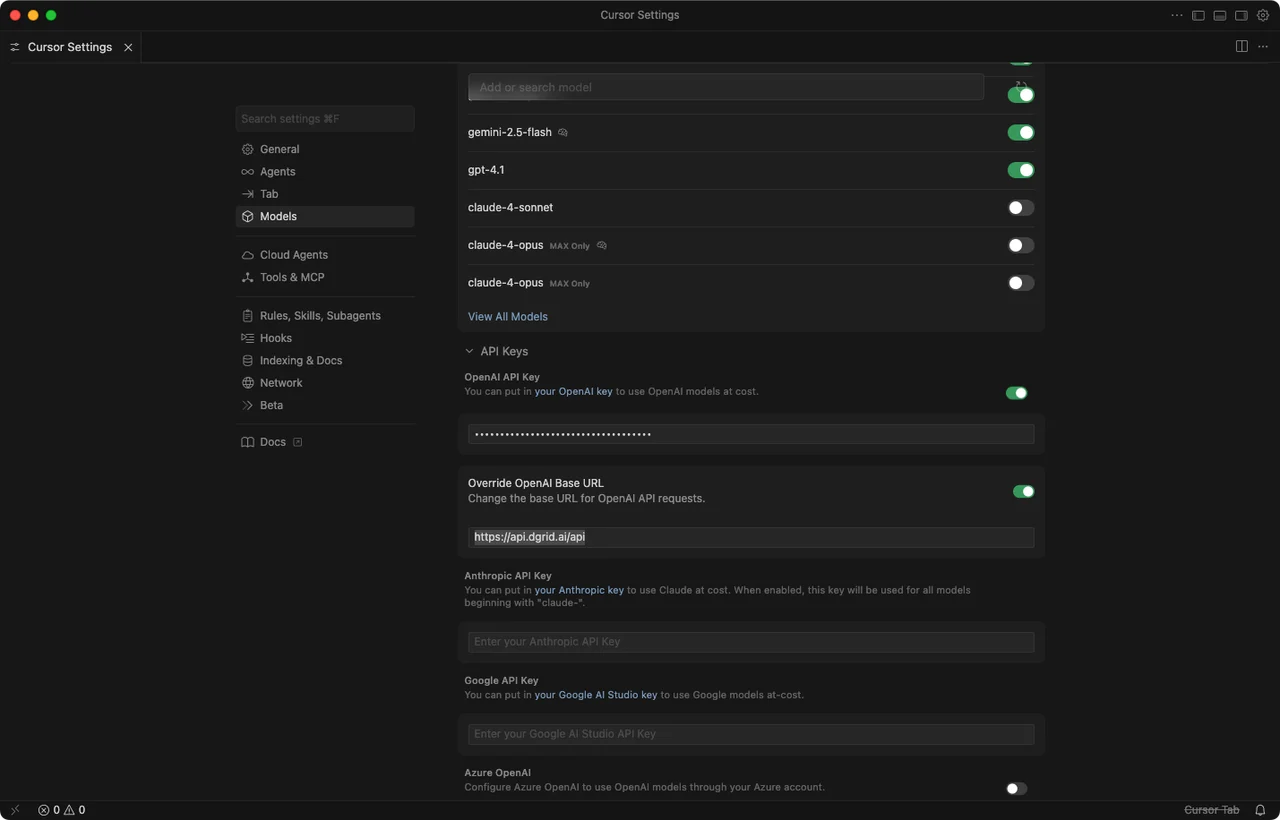 전체 가이드: [How to Configure and Use DGrid AI Gateway in Cursor](https://blog.dgrid.ai/posts/2026-02-18/)
## OpenAI SDK (Node.js / Python)
* 참고: [AI Gateway 빠른 시작](/ko/ai-gateway/overview#quickstart)
## OpenClaw
OpenAI 호환 엔드포인트를 사용하여 DGrid AI Gateway를 통해 요청을 라우팅하도록 OpenClaw를 설정할 수 있습니다.
1. OpenClaw의 모델/제공자 설정을 엽니다.
2. API base URL을 `https://api.dgrid.ai/v1`로 설정합니다.
3. API 키 필드에 `DGRID_API_KEY`를 붙여넣습니다.
4. 지원되는 DGrid 모델 ID를 선택합니다.
5. 설정을 저장하고 간단한 테스트 요청을 실행합니다.
## 블로그 통합 가이드 모음
* **AI as Workspace (AIaW)**: [Step-by-Step Guide: Configure DGrid AI Gateway in AI as Workspace (AIaW)](https://blog.dgrid.ai/posts/2026-03-10/)
* **AnythingLLM**: [Tutorial: Using DGrid AI Gateway with AnythingLLM](https://blog.dgrid.ai/posts/2026-01-30/)
* **Chatbox**: [Step-by-Step Guide: Configure DGrid AI Gateway in Chatbox](https://blog.dgrid.ai/posts/2026-03-09/)
* **Claude Code**: [Use Claude Code with DGrid](https://blog.dgrid.ai/posts/2026-03-12/)
* **Codex CLI**: [Using Codex CLI with DGrid: A Complete Guide](https://blog.dgrid.ai/posts/2026-03-23/)
* **Junie CLI**: [Step-by-Step Guide: Integrate DGrid with Junie CLI](https://blog.dgrid.ai/posts/2026-04-13/)
* **LibreChat**: [Using DGrid with LibreChat: A Step-by-Step Guide](https://blog.dgrid.ai/posts/2026-01-28/)
* **LobeChat**: [Configuring and Utilizing DGrid AI Gateway in LobeChat: A Full Guide](https://blog.dgrid.ai/posts/2026-02-09/)
* **Open WebUI**: [Using DGrid AI Gateway with Open WebUI: A Comprehensive Guide](https://blog.dgrid.ai/posts/2026-01-22_2/)
* **OpenClaw (agent platform)**: [Supercharging OpenClaw with DGrid: The Ultimate AI Agent Setup](https://blog.dgrid.ai/posts/2026-02-02/)
* **OpenClaw (no-code)**: [Step-by-Step Guide: OpenClaw Installation & DGrid AI Gateway Setup (No Code Required)](https://blog.dgrid.ai/posts/2026-02-27/)
* **Vercel AI SDK**: [How to Use DGrid AI Gateway with the Vercel AI SDK](https://blog.dgrid.ai/posts/2026-03-26/)
전체 가이드: [How to Configure and Use DGrid AI Gateway in Cursor](https://blog.dgrid.ai/posts/2026-02-18/)
## OpenAI SDK (Node.js / Python)
* 참고: [AI Gateway 빠른 시작](/ko/ai-gateway/overview#quickstart)
## OpenClaw
OpenAI 호환 엔드포인트를 사용하여 DGrid AI Gateway를 통해 요청을 라우팅하도록 OpenClaw를 설정할 수 있습니다.
1. OpenClaw의 모델/제공자 설정을 엽니다.
2. API base URL을 `https://api.dgrid.ai/v1`로 설정합니다.
3. API 키 필드에 `DGRID_API_KEY`를 붙여넣습니다.
4. 지원되는 DGrid 모델 ID를 선택합니다.
5. 설정을 저장하고 간단한 테스트 요청을 실행합니다.
## 블로그 통합 가이드 모음
* **AI as Workspace (AIaW)**: [Step-by-Step Guide: Configure DGrid AI Gateway in AI as Workspace (AIaW)](https://blog.dgrid.ai/posts/2026-03-10/)
* **AnythingLLM**: [Tutorial: Using DGrid AI Gateway with AnythingLLM](https://blog.dgrid.ai/posts/2026-01-30/)
* **Chatbox**: [Step-by-Step Guide: Configure DGrid AI Gateway in Chatbox](https://blog.dgrid.ai/posts/2026-03-09/)
* **Claude Code**: [Use Claude Code with DGrid](https://blog.dgrid.ai/posts/2026-03-12/)
* **Codex CLI**: [Using Codex CLI with DGrid: A Complete Guide](https://blog.dgrid.ai/posts/2026-03-23/)
* **Junie CLI**: [Step-by-Step Guide: Integrate DGrid with Junie CLI](https://blog.dgrid.ai/posts/2026-04-13/)
* **LibreChat**: [Using DGrid with LibreChat: A Step-by-Step Guide](https://blog.dgrid.ai/posts/2026-01-28/)
* **LobeChat**: [Configuring and Utilizing DGrid AI Gateway in LobeChat: A Full Guide](https://blog.dgrid.ai/posts/2026-02-09/)
* **Open WebUI**: [Using DGrid AI Gateway with Open WebUI: A Comprehensive Guide](https://blog.dgrid.ai/posts/2026-01-22_2/)
* **OpenClaw (agent platform)**: [Supercharging OpenClaw with DGrid: The Ultimate AI Agent Setup](https://blog.dgrid.ai/posts/2026-02-02/)
* **OpenClaw (no-code)**: [Step-by-Step Guide: OpenClaw Installation & DGrid AI Gateway Setup (No Code Required)](https://blog.dgrid.ai/posts/2026-02-27/)
* **Vercel AI SDK**: [How to Use DGrid AI Gateway with the Vercel AI SDK](https://blog.dgrid.ai/posts/2026-03-26/)