> ## Documentation Index
> Fetch the complete documentation index at: https://docs.dgrid.ai/llms.txt
> Use this file to discover all available pages before exploring further.
# Integration Tutorials
> Step-by-step integration tutorials showing how to connect DGrid AI Gateway to popular developer tools, SDKs, frameworks, and AI coding assistants.
This page collects practical integration tutorials for using **DGrid AI Gateway** in common developer tools and SDKs.
## Cursor (Override OpenAI Base URL)
1. Get your `DGRID_API_KEY` (see the prerequisite in [AI Gateway](/ai-gateway/overview)).
2. Open **Cursor Settings** → **Models**.
3. Under **API Keys**, enable **Override OpenAI Base URL**.
4. Set the base URL to:
* `https://api.dgrid.ai/v1`
5. Paste your `DGRID_API_KEY` into **OpenAI API Key**.
6. Pick any supported model name using the DGrid format (for example: `openai/gpt-4o`).
Full tutorial: [How to Configure and Use DGrid AI Gateway in Cursor](https://blog.dgrid.ai/posts/2026-02-18/)
## OpenAI SDK (Node.js / Python)
* See: [AI Gateway Quickstart](/ai-gateway/overview#quickstart)
## OpenClaw
You can configure OpenClaw to route requests through **DGrid AI Gateway** using the OpenAI-compatible endpoint.
1. Open your OpenClaw model/provider settings.
2. Set the API base URL to `https://api.dgrid.ai/v1`.
3. Paste your `DGRID_API_KEY` into the API key field.
4. Select a supported DGrid model ID.
5. Save the configuration and run a quick test request.
## Blog integration tutorials (collected)
* **AI as Workspace (AIaW)**: [Step-by-Step Guide: Configure DGrid AI Gateway in AI as Workspace (AIaW)](https://blog.dgrid.ai/posts/2026-03-10/)
* **AnythingLLM**: [Tutorial: Using DGrid AI Gateway with AnythingLLM](https://blog.dgrid.ai/posts/2026-01-30/)
* **Chatbox**: [Step-by-Step Guide: Configure DGrid AI Gateway in Chatbox](https://blog.dgrid.ai/posts/2026-03-09/)
* **Claude Code**: [Use Claude Code with DGrid](https://blog.dgrid.ai/posts/2026-03-12/)
* **Codex CLI**: [Using Codex CLI with DGrid: A Complete Guide](https://blog.dgrid.ai/posts/2026-03-23/)
* **Junie CLI**: [Step-by-Step Guide: Integrate DGrid with Junie CLI](https://blog.dgrid.ai/posts/2026-04-13/)
* **LibreChat**: [Using DGrid with LibreChat: A Step-by-Step Guide](https://blog.dgrid.ai/posts/2026-01-28/)
* **LobeChat**: [Configuring and Utilizing DGrid AI Gateway in LobeChat: A Full Guide](https://blog.dgrid.ai/posts/2026-02-09/)
* **Open WebUI**: [Using DGrid AI Gateway with Open WebUI: A Comprehensive Guide](https://blog.dgrid.ai/posts/2026-01-22_2/)
* **OpenClaw (agent platform)**: [Supercharging OpenClaw with DGrid: The Ultimate AI Agent Setup](https://blog.dgrid.ai/posts/2026-02-02/)
* **OpenClaw (no-code)**: [Step-by-Step Guide: OpenClaw Installation & DGrid AI Gateway Setup (No Code Required)](https://blog.dgrid.ai/posts/2026-02-27/)
* **Vercel AI SDK**: [How to Use DGrid AI Gateway with the Vercel AI SDK](https://blog.dgrid.ai/posts/2026-03-26/)
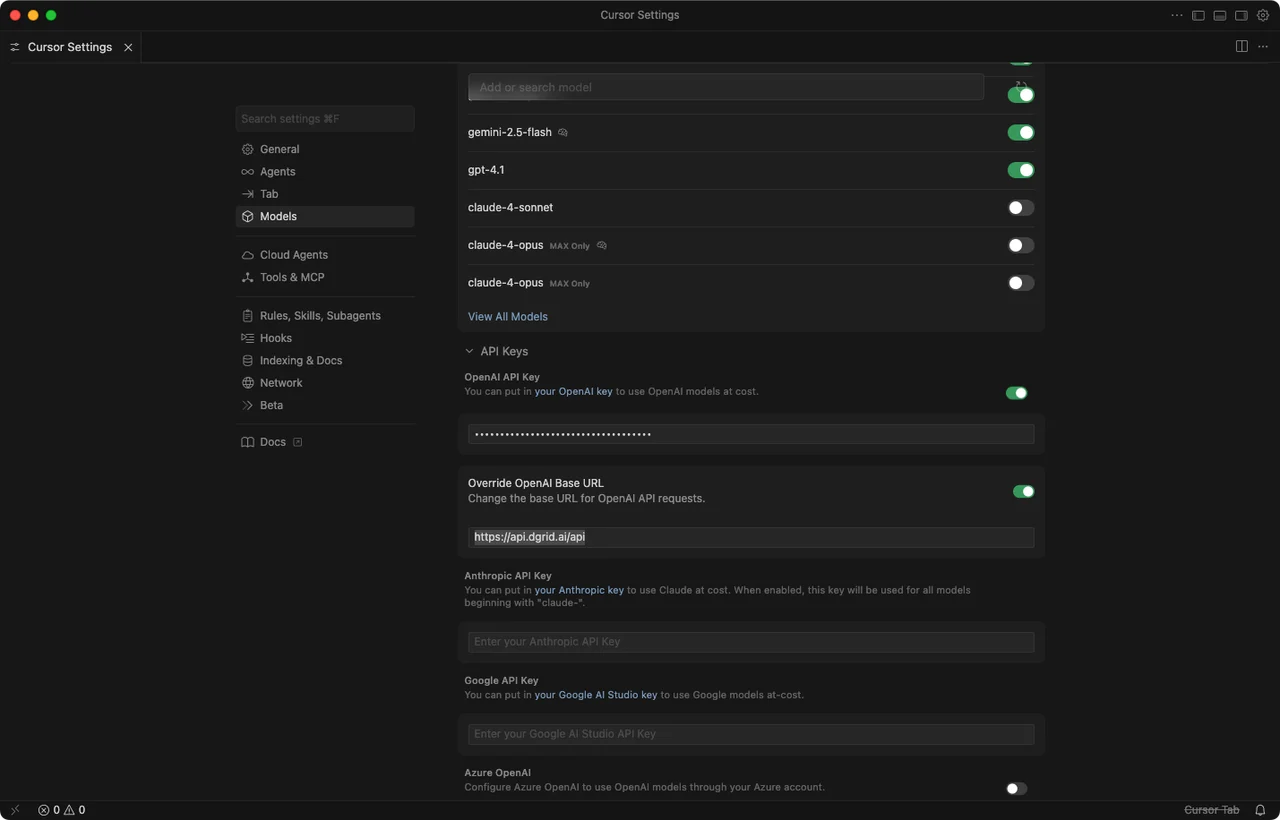 Full tutorial: [How to Configure and Use DGrid AI Gateway in Cursor](https://blog.dgrid.ai/posts/2026-02-18/)
## OpenAI SDK (Node.js / Python)
* See: [AI Gateway Quickstart](/ai-gateway/overview#quickstart)
## OpenClaw
You can configure OpenClaw to route requests through **DGrid AI Gateway** using the OpenAI-compatible endpoint.
1. Open your OpenClaw model/provider settings.
2. Set the API base URL to `https://api.dgrid.ai/v1`.
3. Paste your `DGRID_API_KEY` into the API key field.
4. Select a supported DGrid model ID.
5. Save the configuration and run a quick test request.
## Blog integration tutorials (collected)
* **AI as Workspace (AIaW)**: [Step-by-Step Guide: Configure DGrid AI Gateway in AI as Workspace (AIaW)](https://blog.dgrid.ai/posts/2026-03-10/)
* **AnythingLLM**: [Tutorial: Using DGrid AI Gateway with AnythingLLM](https://blog.dgrid.ai/posts/2026-01-30/)
* **Chatbox**: [Step-by-Step Guide: Configure DGrid AI Gateway in Chatbox](https://blog.dgrid.ai/posts/2026-03-09/)
* **Claude Code**: [Use Claude Code with DGrid](https://blog.dgrid.ai/posts/2026-03-12/)
* **Codex CLI**: [Using Codex CLI with DGrid: A Complete Guide](https://blog.dgrid.ai/posts/2026-03-23/)
* **Junie CLI**: [Step-by-Step Guide: Integrate DGrid with Junie CLI](https://blog.dgrid.ai/posts/2026-04-13/)
* **LibreChat**: [Using DGrid with LibreChat: A Step-by-Step Guide](https://blog.dgrid.ai/posts/2026-01-28/)
* **LobeChat**: [Configuring and Utilizing DGrid AI Gateway in LobeChat: A Full Guide](https://blog.dgrid.ai/posts/2026-02-09/)
* **Open WebUI**: [Using DGrid AI Gateway with Open WebUI: A Comprehensive Guide](https://blog.dgrid.ai/posts/2026-01-22_2/)
* **OpenClaw (agent platform)**: [Supercharging OpenClaw with DGrid: The Ultimate AI Agent Setup](https://blog.dgrid.ai/posts/2026-02-02/)
* **OpenClaw (no-code)**: [Step-by-Step Guide: OpenClaw Installation & DGrid AI Gateway Setup (No Code Required)](https://blog.dgrid.ai/posts/2026-02-27/)
* **Vercel AI SDK**: [How to Use DGrid AI Gateway with the Vercel AI SDK](https://blog.dgrid.ai/posts/2026-03-26/)
Full tutorial: [How to Configure and Use DGrid AI Gateway in Cursor](https://blog.dgrid.ai/posts/2026-02-18/)
## OpenAI SDK (Node.js / Python)
* See: [AI Gateway Quickstart](/ai-gateway/overview#quickstart)
## OpenClaw
You can configure OpenClaw to route requests through **DGrid AI Gateway** using the OpenAI-compatible endpoint.
1. Open your OpenClaw model/provider settings.
2. Set the API base URL to `https://api.dgrid.ai/v1`.
3. Paste your `DGRID_API_KEY` into the API key field.
4. Select a supported DGrid model ID.
5. Save the configuration and run a quick test request.
## Blog integration tutorials (collected)
* **AI as Workspace (AIaW)**: [Step-by-Step Guide: Configure DGrid AI Gateway in AI as Workspace (AIaW)](https://blog.dgrid.ai/posts/2026-03-10/)
* **AnythingLLM**: [Tutorial: Using DGrid AI Gateway with AnythingLLM](https://blog.dgrid.ai/posts/2026-01-30/)
* **Chatbox**: [Step-by-Step Guide: Configure DGrid AI Gateway in Chatbox](https://blog.dgrid.ai/posts/2026-03-09/)
* **Claude Code**: [Use Claude Code with DGrid](https://blog.dgrid.ai/posts/2026-03-12/)
* **Codex CLI**: [Using Codex CLI with DGrid: A Complete Guide](https://blog.dgrid.ai/posts/2026-03-23/)
* **Junie CLI**: [Step-by-Step Guide: Integrate DGrid with Junie CLI](https://blog.dgrid.ai/posts/2026-04-13/)
* **LibreChat**: [Using DGrid with LibreChat: A Step-by-Step Guide](https://blog.dgrid.ai/posts/2026-01-28/)
* **LobeChat**: [Configuring and Utilizing DGrid AI Gateway in LobeChat: A Full Guide](https://blog.dgrid.ai/posts/2026-02-09/)
* **Open WebUI**: [Using DGrid AI Gateway with Open WebUI: A Comprehensive Guide](https://blog.dgrid.ai/posts/2026-01-22_2/)
* **OpenClaw (agent platform)**: [Supercharging OpenClaw with DGrid: The Ultimate AI Agent Setup](https://blog.dgrid.ai/posts/2026-02-02/)
* **OpenClaw (no-code)**: [Step-by-Step Guide: OpenClaw Installation & DGrid AI Gateway Setup (No Code Required)](https://blog.dgrid.ai/posts/2026-02-27/)
* **Vercel AI SDK**: [How to Use DGrid AI Gateway with the Vercel AI SDK](https://blog.dgrid.ai/posts/2026-03-26/)